Portfolio & Account Screens
This page covers the Portfolio tab (where customers see their own investments, transactions and reports) and the Account tab (all settings — profile, bank, nominee, mandate, and more).
Portfolio tab
The Portfolio tab has three sub-tabs at the top — My Investments, Transactions, Reports. The blue summary card on top is shared across all three sub-tabs — Current Value, Investment, 1 Day Returns, XIRR.
My Investments

What the customer sees on the My Investments landing:
| Section | Content |
|---|---|
| Page header | My Portfolio, search-for-funds chip, dark-mode toggle, notification bell |
| Summary card | Last updated as of 12:00 pm 02/06/2025, Perccent Portfolio ▾ selector, Current Value ₹4,28,750 with day-change chip +12.4% |
| KPI rows | Investment across N funds · 1 Day Returns (-0.6% from last day) · XIRR (8.2%, +2.7% this year) |
| Sub-tabs | My Investments · Transactions · Reports |
| Asset-type chip | Mutual Funds ▾ (dropdown — switches to other asset classes) |
| Holding rows | Each row: fund logo, fund name (e.g. HDFC Mid-Cap Opportunities Fund – Reg…), category chips (Commodities · Gold · High Risk), three columns — Invested · Current · Returns — and a ⋯ menu (Redeem / Switch / SWP) |
| Paginator | 1 · 2 · … · 9 · 10 with prev/next arrows |
| Total Investment card | ₹73,276,931.28 with +11.2% chip and View: All ▾ selector |
| Doughnut chart | Allocation breakdown — ICICI Prudential Nifty 50 Index 49.22%, DSP Nifty Smallcap 250 Quality 12.58%, Edelweiss Nifty Midcap 150 15.59%, Nippon India Nifty Midcap 150 7.78%, ICICI Prudential Nifty Midcap 18.98% — with View more |
Tapping a holding opens its detail page, where the customer can Redeem, Switch, or set up an SWP.
Each holding's detail page shows two views — Investment Details (per-installment history) and Transaction History (every buy / sell row).



What the holding-detail page shows:
| Section | Content |
|---|---|
| Header card | Fund logo + name, Invested, Current, Returns % |
| Invest More CTA | Re-opens the Lumpsum / SIP setup |
| Tabs | Investment Details · Transaction History |
| Filter chips | All / SIP of ₹ / SIP of ₹ (per recurring stream) |
| Previous Installments | Amount, Status (Completed), Date, Folio Number, Paid via, Order ID |
| Cross-sell banners | Complete your KYC in few steps · Import your External Folio to Perccent |
Keyboard: none on overview / history views. Taps and vertical scroll only.
Transactions
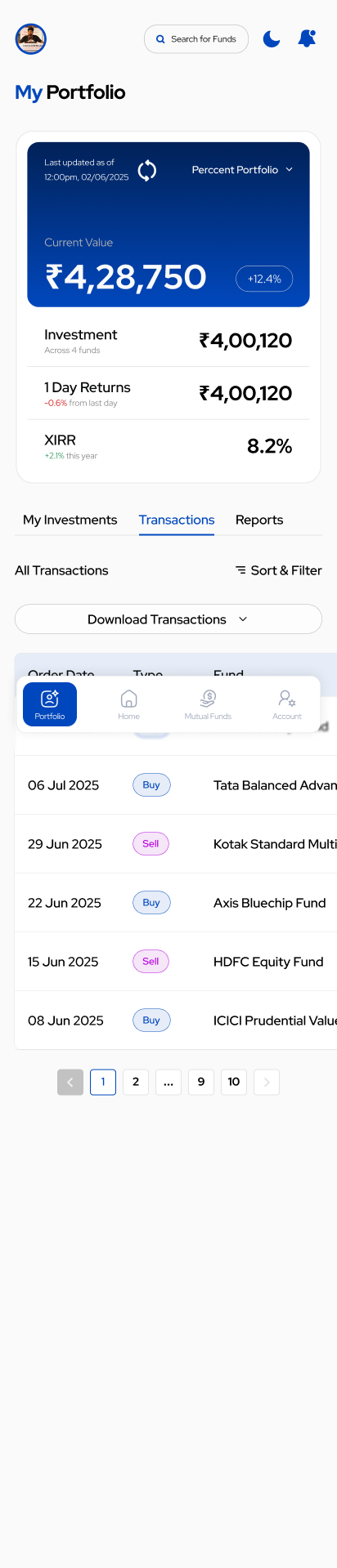
What the customer sees:
| Section | Content |
|---|---|
| Shared summary card | Same Current Value / Investment / 1 Day Returns / XIRR card as My Investments |
| Sub-tabs | My Investments · Transactions (active) · Reports |
| Section title | All Transactions with a ≣ Sort & Filter chip |
| Download | Download Transactions ▾ — exports filtered list to CSV / PDF |
| Table header | Order Date · Type · Fund |
| Row | Date (e.g. 06 Jul 2025), Type pill — Buy (blue outline) or Sell (pink/magenta outline), Fund name (e.g. Tata Balanced Advantage, Kotak Standard Multi…, Axis Bluechip Fund, HDFC Equity Fund, ICICI Prudential Value) |
| Paginator | 1 · 2 · … · 9 · 10 with prev/next |
Read the pills: Buy = inflow (subscription / SIP installment); Sell = outflow (redeem / SWP withdrawal).
Tapping a row opens the Holding detail with full Investment Details + Transaction History (see below).



Keyboard: none on transaction list / report views. Filters, tabs, downloads, row actions are tap-driven.
Reports
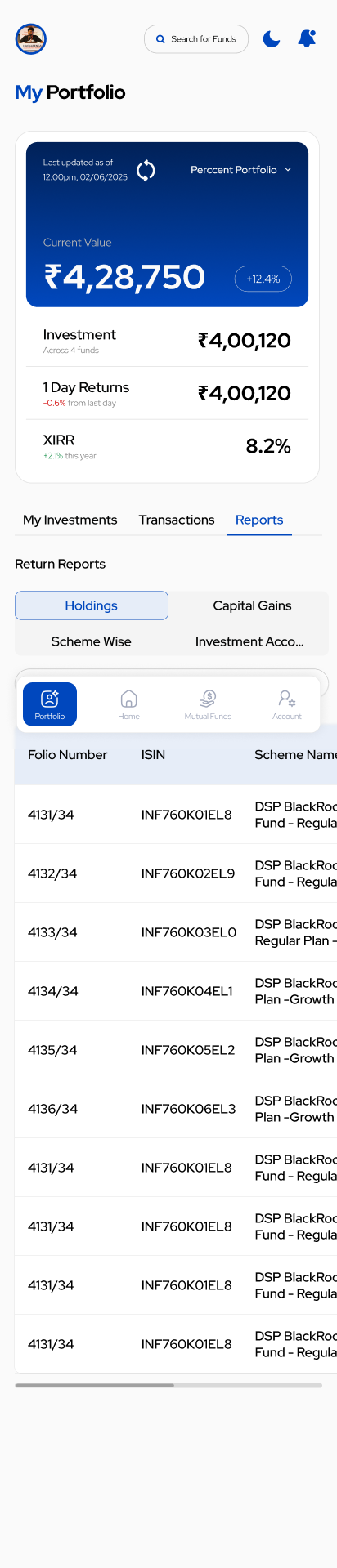
What the customer sees:
| Section | Content |
|---|---|
| Shared summary card | Same blue summary card as My Investments and Transactions |
| Sub-tabs | My Investments · Transactions · Reports (active) |
| Section title | Return Reports |
| Report-type tiles | Holdings (default, blue-highlighted) · Capital Gains · Scheme Wise · Investment Account… |
| Table header | Folio Number · ISIN · Scheme Name |
| Row | Folio (e.g. 4131/34), ISIN (e.g. INF760K01EL8), Scheme Name (e.g. DSP BlackRock … Fund – Regula…) |
| Horizontal scroll | The table scrolls sideways on small screens; more columns (NAV, Units, Value, Date) appear on swipe |
The four reports:
| Report tile | What it is |
|---|---|
| Holdings | Current holdings — Folio / ISIN / Scheme / NAV / Units / Current Value |
| Capital Gains | Realised gains by financial year, short-term vs long-term — used for tax filing |
| Scheme Wise | Per-scheme breakdown across folios — invested, redeemed, current, return |
| Investment Account | The Consolidated Account Statement (CAS) view |
Reports can be downloaded as PDF or CSV.
A new order can take 1–2 business days after allotment to show in holdings. The Portfolio also has an "overall" vs "perccent" view (the Perccent Portfolio ▾ selector on the summary card) — make sure the customer is looking at the right one. See the Holdings Mismatch support page.
The CAS is pulled from the registrars (CAMS/KFintech) and authorised with the customer's PAN + an email OTP. The email must match the one registered with the registrar. See the CAS Import Issues support page.
Account tab
The Account tab has two visible states — collapsed (the default landing, a stack of section rows) and expanded (each section opens into full read/write content).
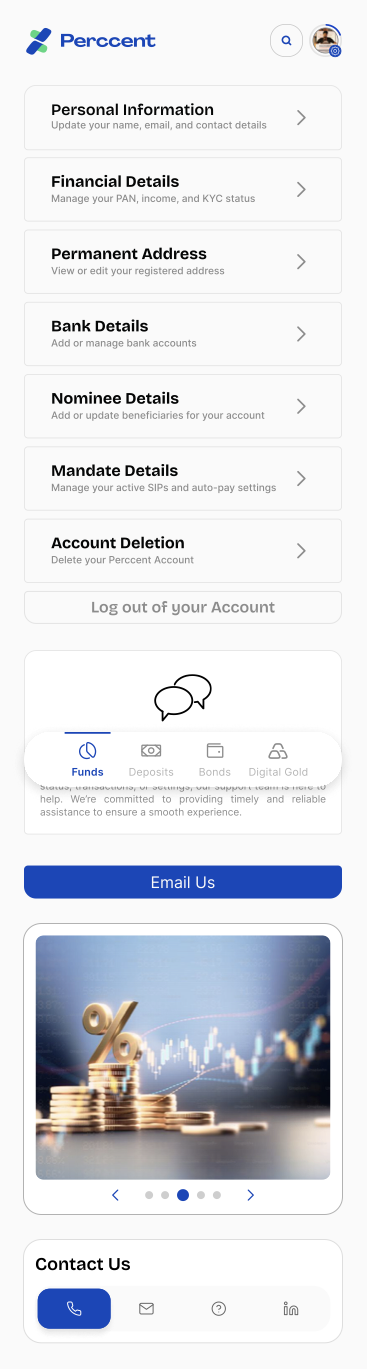

Keyboard: mixed. Text fields use the OS keyboard only after a section is expanded. Pure accordion navigation is tap-only.
Collapsed view — the section rows
| Row | Sub-line | What the customer can do |
|---|---|---|
| Personal Information | Update your name, email, and contact details | View / edit name, email, phone, gender, DOB, father's name, last-4 of Aadhaar, tax status, country & place of birth. PAN is locked after KYC. |
| Financial Details | Manage your PAN, income, and KYC status | View KYC compliance fields — Occupation, Income Slab, PEP status, Source of Wealth, Tax Residency, and the uploaded signature. |
| Permanent Address | View or edit your registered address | See and edit the address, city, state, and PIN code on record |
| Bank Details | Add or manage bank accounts | Add a new bank, set primary, remove a bank. Each bank card shows account holder name, masked account number, IFSC, and account type |
| Nominee Details | Add or update beneficiaries for your account | Up to 4 nominees. Each captures name, relationship, PAN, DOB, allocation %, phone, email, address (with "Address same as permanent address" checkbox) |
| Mandate Details | Manage your active SIPs and auto-pay settings | See active mandates by bank; pause or cancel a mandate. Each bank groups its SIP mandate cards underneath |
| Account Deletion | Delete your Perccent Account | Permanently deletes the account — confirm before tapping |
| Log out of your Account | — | Signs out of this device only |
Below the section list, the screen shows a Need Help? card (with Email Us CTA), a horizontal carousel of category banners, and a Contact Us strip with phone / email / help / LinkedIn icons.
Expanded view — what each section reveals
Personal Information — First Name, Last Name, Gender, DOB, Email Address, Phone Number, Father's Name, Last 4 Digits of Aadhaar, Tax Status, Country of Birth, Place of Birth.
Compliance Information (inside Financial Details) — Occupation, Income Slab, PEP status, Source of Wealth, Tax Residency, Upload Signature preview.
Permanent Address — Address, City, PIN code, State.
Bank Details (multi-bank) — each bank card shows:
- Bank logo + masked account number (e.g. HDFC Bank 2394 — Savings Account — Verified — Primary)
- Expanded card reveals Account Information block: Account Holder Name, Account Number, IFSC Code, Account Type
- Row actions — Remove A/c · Set as primary
Nominee Details — up to 4 nominee cards (Nominee 1 / 2 / 3 / 4). The expanded card shows Nominee Name, Relationship to Nominee, PAN, DOB, Allocation Percentage, Phone Number, Email ID, Address, Address same as permanent address checkbox, and Edit Details.
Mandate Details — grouped by bank. Each bank card lists its active mandates as smaller cards underneath:
- HDFC Bank 2394 — Savings Account — Primary → Mutual Funds SIP × 4 (each shows logo + ₹1,00,000 cap + eNACH)
- ICICI Bank 2294 — Savings Account
- State Bank of India 2394 — Savings Account
Account Deletion — "Do you want to delete your Perccent account?" with a destructive Delete Account button.
Bottom of the screen (both states)
| Element | What it is |
|---|---|
| Need Help? card | Support copy — "If you have any questions regarding your account, KYC status, transactions, or settings, our support team is here to help. We're committed to providing timely and reliable assistance to ensure a smooth experience." |
| Email Us | Primary support CTA |
| Log Out | Sign out of this device |
| Category banners | Complete your KYC in few steps · Import your External Folio to Perccent |
| Carousel | Promo images |
| Contact Us | Phone · Email · Help · LinkedIn icons |
For the customer's safety, neither a support agent nor the app may: change document sharing/permissions, enter the customer's bank login or card details, or place an order on the customer's behalf. Bank and card details must always be entered by the customer themselves.
Email / phone change
- Email change triggers a fresh email verification.
- Phone number is the customer's login identity — phone changes may need L2 / identity re-verification. See the Email / Phone Change support page.
Mandate management
From Mandate Details, a customer can see each mandate's status and cancel it. Cancelling a mandate stops the linked SIPs from debiting — make sure the customer understands this before they cancel.
Account deletion
The Account Deletion row is destructive and irreversible. Before walking a customer through it:
- Confirm they understand all holdings will need to be redeemed or transferred elsewhere.
- Confirm they have downloaded CAS and Capital Gains reports from the Reports tab.
- Confirm there are no active mandates or pending orders.
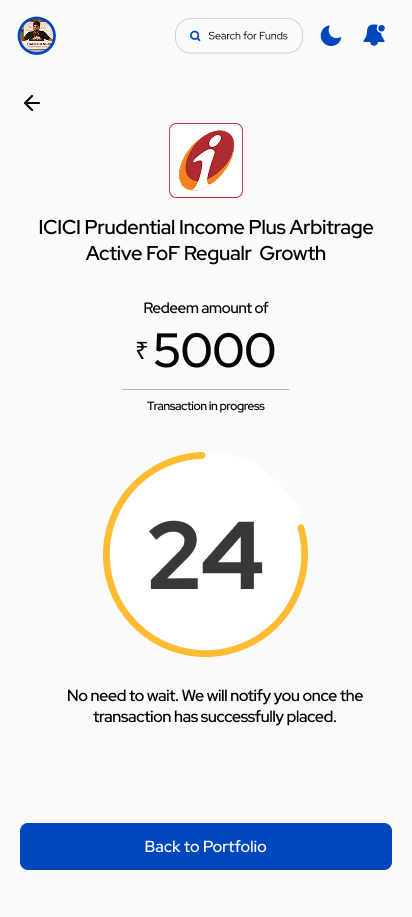
Redemption status
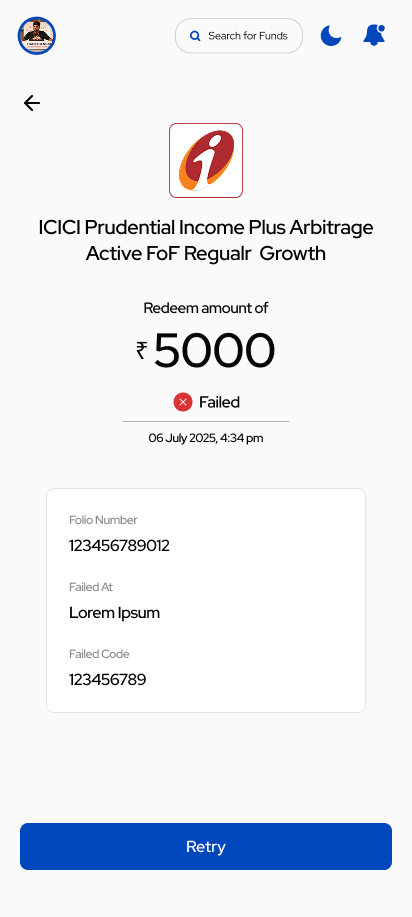
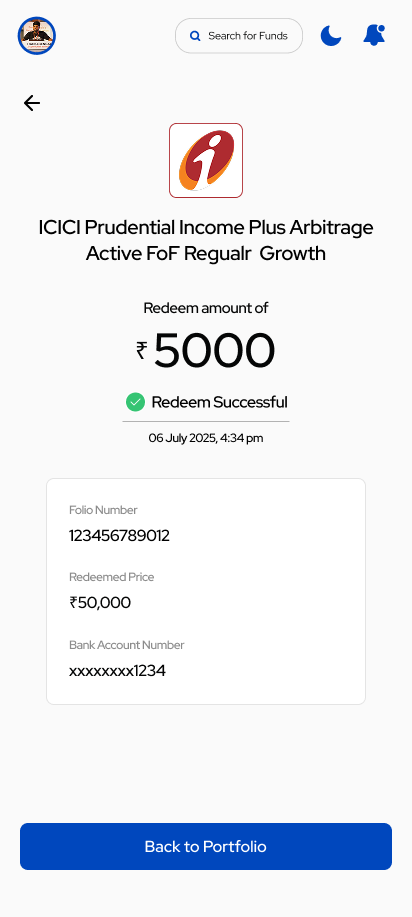
When a customer redeems from an existing holding, they see the same status patterns as investment flows — in progress, failed, or successful.
The app loads profile details once per login. If a customer updated something and still sees old data, ask them to log out and log back in — that forces a fresh load.